 VVavy
VVavy
Matcha Whisper: A CapCut-Style Effect That Reacts To Your Music
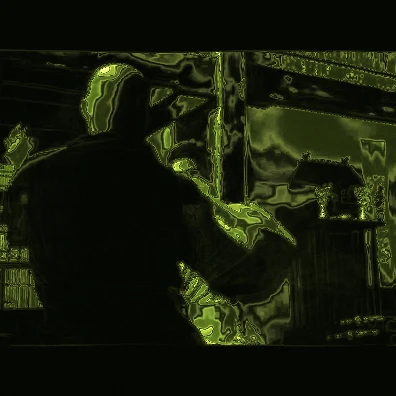
Matcha Whisper starts with the same promise that makes a good CapCut effect so satisfying: give ordinary footage a recognizable visual identity fast. A face, room, captured tab, uploaded video, or image becomes a relief-like field of black ink, deep olive, leaf green, powdered matcha, and cream. The cooler part is that the treatment does not simply sit on the footage. Matcha Whisper listens to the track and reshapes its flow, contour detail, color, and persistence from one frame to the next.
Why Matcha Whisper has that CapCut-like appeal
CapCut is good at making an effect or template feel immediately legible: choose your media, apply a strong look, and get to an edit quickly. Matcha Whisper shares that low-friction appeal. You do not need to design a palette or build a shader before your source starts looking completely different.
The visual softens the source, separates it into sculpted tonal bands, traces the boundaries, and remaps the image through a matcha-inspired palette. Faces and room details remain recognizable, but they feel pressed into a moving illustrated surface instead of left as ordinary camera footage.
The fair comparison: edited beat sync versus a live visual instrument
CapCut is not disconnected from music. Its Auto Cut and Beat Sync tools can analyze a selected track and build rhythm-aware cuts, while templates give creators a fast route to a finished edit. That is useful when the goal is to assemble and export a timeline-based video.
Matcha Whisper solves a different problem. It is a live visual instrument inside VVavy. The camera or uploaded source is processed frame by frame while VVavy continuously analyzes the audio. Instead of using the song mainly to decide where an edit changes, the sound becomes part of how the image is drawn at that exact moment.
In practical terms:
- CapCut helps turn clips and a track into a prepared edit through effects, templates, and timeline tools.
- Matcha Whisper treats a live or uploaded picture continuously while the current sound changes its rendering.
- Both can get you to a strong aesthetic quickly, but Matcha Whisper is designed to perform with the audio as it happens.
What the music actually changes
The audio reaction is not one generic pulse placed over the finished picture. Matcha Whisper separates the sound into several signals and gives each one a visual job. That is why a bass-heavy section feels different from a bright, busy section even when the camera does not move.
Those signals are smoothed with quick attacks and slower releases, so the look can catch a beat without turning into random frame-to-frame flicker. A short feedback buffer also lets previous contours drift into the next frame, creating the slow liquid current in the visual instead of making every moment feel like a disconnected filter pass.
The main audio-to-image connections include:
- Overall amplitude adds body and contrast to the sculpted bands.
- Bass and mids increase the source warp, brush width, and slow liquid drift.
- Treble and spectral flux sharpen edges, tighten contour detail, and lift fine texture.
- Spectral centroid shifts the matcha palette between cooler leaf tones and warmer powder tones.
- Stereo balance and spread steer and widen the flow across the frame.
- Reverb lets more of the previous image linger, while detected beats briefly refresh and accent the treatment.
Why audio reactivity makes the effect feel cooler
A fixed visual treatment can look great, but you usually learn its whole trick after a few seconds. Matcha Whisper keeps revealing different versions of itself because the track changes the balance between movement, ink, relief, color, and memory. A quiet passage can settle into soft olive layers; a bass entrance can pull the picture into a broader current; brighter percussion can bring the contour work forward.
That makes the source feel less like footage with a filter on top and more like material being played by the music. It also means two tracks produce meaningfully different performances from the same camera angle. That is the part that feels cooler than simply choosing an aesthetic once: the aesthetic stays in conversation with the sound.
How to try Matcha Whisper in VVavy
Open Matcha Whisper in VVavy, connect the audio you want it to hear, then give it a picture source. You can use a camera, captured tab, uploaded video, or image. Once both sides are connected, the visual handles the matcha palette and live response automatically.
Start with a source that has clear light and shadow so the tonal bands have strong shapes to sculpt. Faces, silhouettes, rooms, hands, and graphic objects all give the contour treatment something readable to hold onto. Then try two tracks with different low-end and high-frequency character to see how much the same source can change.
Quick start:
- Open Matcha Whisper directly in VVavy.
- Connect a track, microphone, browser tab, SoundCloud, or another supported audio source.
- Connect a camera, captured tab, uploaded video, or still image for the picture.
- Let the track move through the source, then record the performance when the combination feels right.
Keep exploring
Common questions
Turn your camera into a matcha visual instrument
Open Matcha Whisper, connect a picture and a track, and watch the contours perform with the sound in real time.